Logo Mockup on Polygon Board: Elevating Brand Presentations with Geometric Precision
In the competitive landscape of modern branding, the way a logo is presented can be just as critical as the design itself. A static image on a white background often fails to convey the tactile quality or the environmental context of a brand identity. This is where the Logo Mockup on Polygon Board emerges as a vital tool for designers, marketers, and business owners. By introducing a stunning and entirely customizable digital art composition, this resource transforms flat designs into immersive visual experiences. It offers a sleek polygon frame that stands apart from traditional rectangular displays, providing a unique aesthetic that commands attention and adds depth to your portfolio.
The Architecture of Visual Appeal
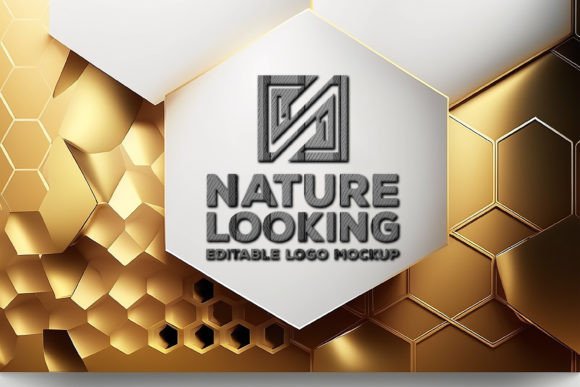
The core value of the Logo Mockup on Polygon Board lies in its intricate design philosophy. Unlike standard mockups that simply paste a logo onto a wall or a piece of paper, this composition utilizes a sophisticated geometric structure. The central feature is a unique white polygon board set against a lavish golden background and frame. This contrast is not merely decorative; it serves a functional purpose by drawing the viewer’s eye directly to the center of the composition, ensuring that your design remains the focal point.
The resolution of 4267x3006 pixels combined with a 300 DPI quality ensures that every detail is crisp and print-ready. Whether you are creating digital assets for social media or high-resolution prints for client presentations, the clarity remains uncompromised. The availability of both JPEG and PSD file types further enhances its utility. For quick previews, the JPEG format suffices, but the PSD file unlocks the true potential of the mockup through layer-based editing.
Texture and Dimension: The Twill Fabric Effect
One of the most distinguishing characteristics of this mockup is the inclusion of a twill fabric effect. In digital design, achieving a sense of touch is challenging. However, the subtle texture provided by the twill pattern adds a layer of realism that flat colors cannot achieve. This texture interacts with light and shadow, giving the polygon board a tangible presence. When you place your logo on this surface, it appears to sit within a physical space rather than floating in a digital void.
This attention to textural detail is crucial for brands that emphasize craftsmanship, luxury, or high-quality materials. The interplay between the smooth geometric lines of the polygon and the organic weave of the fabric creates a dynamic visual tension that keeps the viewer engaged. It suggests that the brand behind the logo values both modern precision and traditional quality.
Practical Applications for Creators and Businesses
Understanding where and how to use the Logo Mockup on Polygon Board can significantly enhance its impact on your workflow. This tool is versatile, catering to a wide range of professional needs:
- Client Presentations: When pitching a new identity to a client, a mockup helps them visualize the final product in a realistic setting. The luxurious lounge setting created by the ambient lamp light and golden tones suggests premium value, helping to justify higher pricing tiers.
- Portfolio Enhancement: For graphic designers, a portfolio filled with flat vectors can appear dry. Incorporating geometric mockups demonstrates an understanding of context and presentation, showcasing your ability to think beyond the vector path.
- Social Media Marketing: High-impact visuals perform better on platforms like Instagram and Pinterest. The striking contrast of white polygons against gold backgrounds is inherently shareable and eye-catching, increasing engagement rates.
- Product Packaging Previews: If your logo is intended for physical products, this mockup provides a bridge between the digital design and the physical object, helping stakeholders understand how the branding will look in real-world applications.
Navigating the Editing Process
For those unfamiliar with advanced photo editing software, the term "smart objects" might seem intimidating. However, the Logo Mockup on Polygon Board is designed with user-friendliness in mind. The PSD file utilizes smart object technology, which allows for a non-destructive editing process. This means you can swap out styles, texts, and logos without altering the underlying structure of the mockup.
- Open the PSD File: Launch the file in Adobe Photoshop or a compatible editor.
- Locate the Smart Object Layer: Identify the layer designated for your logo insertion, usually marked clearly in the layers panel.
- Insert Your Design: Double-click the smart object thumbnail to open a new window. Paste your logo here, ensuring it is centered and scaled appropriately.
- Save and Update: Save the smart object file. The main mockup document will automatically update, reflecting your changes with the correct perspective, lighting, and texture effects applied.
This streamlined process makes the set 100% adaptable to suit individual preferences. You can experiment with different color variations of your logo or test various typographic treatments without starting from scratch each time. The efficiency gained here allows creators to produce multiple variations quickly, facilitating faster decision-making processes.
Evaluating Suitability: Is This Mockup Right for Your Project?
While the Logo Mockup on Polygon Board offers numerous advantages, it is essential to evaluate its suitability for specific projects. Not every brand identity benefits from a luxurious, geometric presentation. Here are some considerations to keep in mind:
Brand Alignment: The golden tones and polygon shapes evoke feelings of modernity, luxury, and sophistication. If your brand identity is rustic, playful, or minimalist in a stark way, this mockup might clash with your message. Always ensure that the mood of the mockup aligns with the core values of the brand you are representing.
Complexity of Design: Highly detailed logos may get lost if the polygon frame is too dominant. Conversely, very simple logos benefit greatly from the added texture and context. Consider the balance between the mockup’s elements and your design. The triangled, geometric design paired with golden tones is a sure way to command attention, but it should not overshadow the logo itself.
Technical Requirements: To fully utilize the PSD features, access to Adobe Photoshop or similar software is necessary. If you only have access to basic image viewers, the JPEG version limits your ability to customize the logo placement, reducing the mockup’s flexibility.
The Strategic Value of Geometric Aesthetics
Incorporating a low poly mockup or polygon shape into your branding strategy offers more than just visual appeal; it communicates a message of structural integrity and modern thinking. Geometry is often associated with stability, logic, and innovation. By framing your logo within these shapes, you subtly reinforce these attributes in the minds of your audience.
Furthermore, the 3D exterior design coupled with a flat, modern interior mockup transforms any ordinary living room scene into a luxurious lounge setting. This contextualization helps consumers imagine the brand as part of their lifestyle. The ambient, bright lamp light casts soft shadows that enhance the three-dimensionality, making the logo feel like a physical object occupying real space. This psychological cue can increase perceived value and trust in the brand.
Conclusion
The Logo Mockup on Polygon Board is more than a digital asset; it is a strategic tool for enhancing brand perception. With its high-resolution output, customizable smart objects, and sophisticated twill fabric texture, it provides a professional platform for showcasing design work. Whether you are a seasoned designer looking to elevate your portfolio or a business owner aiming to present your brand with elegance, this mockup offers the versatility and quality needed to stand out. By understanding its features and applying them thoughtfully, you can transform ordinary designs into extraordinary visual statements that resonate with your audience.